
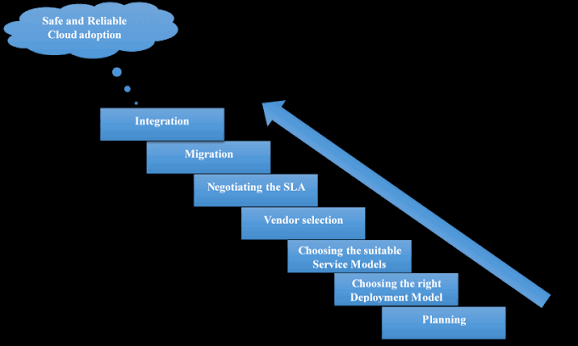
Cloud computing has become one of the most important technologies in today’s digital world. Businesses use cloud platforms to host applications, store data, run websites, build artificial intelligence systems, and manage IT infrastructure.
As cloud adoption continues to grow, so does the demand for professionals who understand how cloud technology works.
If you’re a beginner wondering how to learn cloud computing, the good news is that you don’t need to become an expert overnight. With the right learning path, you can build your knowledge step by step, practice with real projects, and eventually specialize in an area that matches your career goals.
This guide provides a complete cloud computing roadmap for beginners, covering the fundamentals, networking, Linux, cloud platforms, security, hands-on projects, certifications, and advanced skills.
What Is Cloud Computing?
Before learning cloud technologies, it’s important to understand what cloud computing actually means.
Cloud computing is the delivery of computing resources over the internet. Instead of purchasing and maintaining physical servers, organizations can access computing power, storage, databases, networking, and software through cloud platforms.
Major cloud providers include:
- Amazon Web Services (AWS)
- Microsoft Azure
- Google Cloud
Cloud computing can provide organizations with flexibility, scalability, and access to advanced technology without requiring them to own all the underlying infrastructure.
Understanding this basic concept gives you a foundation for everything that follows.
Step 1: Learn the Fundamentals of Cloud Computing
The first stage of your cloud computing journey should focus on concepts rather than specific products.
You should understand:
- What cloud computing is
- How cloud infrastructure works
- Public, private, and hybrid clouds
- Infrastructure as a Service (IaaS)
- Platform as a Service (PaaS)
- Software as a Service (SaaS)
- Virtualization
- Scalability
- Elasticity
- Availability
- Fault tolerance
- Regions and availability zones
Don’t worry about memorizing hundreds of cloud services at this stage.
Your goal is to understand the ideas behind the technology.
For example, learn why a company might choose cloud infrastructure instead of purchasing its own physical servers.
Once these concepts make sense, learning specific cloud services becomes much easier.
Step 2: Learn Basic Networking
Networking is one of the most important skills for cloud computing.
Cloud infrastructure depends heavily on networks, so you should understand the basics before moving into advanced cloud services.
Important networking concepts include:
- IP addresses
- DNS
- TCP/IP
- HTTP and HTTPS
- Ports
- Routers
- Switches
- Firewalls
- Subnets
- Routing
- VPNs
- Load balancing
You don’t need to become a network engineer, but you should understand how computers communicate with each other.
For example, when a user visits a website hosted in the cloud, you should understand the basic journey of the request from the user’s device to the application server.
This knowledge becomes extremely valuable when working with cloud networking.
Step 3: Learn Linux
Linux is widely used in cloud infrastructure.
Many cloud servers run Linux-based operating systems, making Linux administration an important skill for cloud professionals.
Start by learning basic commands and concepts such as:
- Files and directories
- File permissions
- Users and groups
- Processes
- Package management
- SSH
- Environment variables
- Logs
- Shell commands
- Basic Bash scripting
You don’t need to become a Linux expert immediately.
Focus on being comfortable navigating the command line and managing a basic server.
Practice is much more effective than simply reading about commands.
Step 4: Learn a Programming or Scripting Language
You don’t necessarily need to become a professional software developer to work in cloud computing.
However, basic programming knowledge can make your work much easier.
Python is an excellent choice for beginners because it is widely used in automation, cloud engineering, data analysis, and artificial intelligence.
You can also learn Bash scripting for Linux automation.
Focus on concepts such as:
- Variables
- Conditions
- Loops
- Functions
- Lists and dictionaries
- Error handling
- APIs
- File handling
The goal is not to build complicated applications.
Instead, learn enough programming to automate repetitive tasks and understand how cloud applications work.
Step 5: Choose a Cloud Platform
Once you understand the fundamentals, choose one major cloud provider to study in depth.
The three most popular choices are:
Amazon Web Services
{“fallbackMarkdown”:”Amazon Web Services”,”reference”:{“alt”:”Amazon Web Services”,”category”:”company”,”extra_params”:{“disambiguation”:”cloud computing platform by Amazon”},”name”:”Amazon Web Services”,”prompt_text”:”Amazon Web Services”,”status”:”done”,”type”:”entity”},”referenceKey”:”0″,”showLoginRequiredCard”:false} offers a huge range of cloud services and is an excellent platform for learning general cloud infrastructure.
Microsoft Azure
{“fallbackMarkdown”:”Microsoft Azure”,”reference”:{“alt”:”Microsoft Azure”,”category”:”company”,”extra_params”:{“disambiguation”:”Microsoft cloud computing platform”},”name”:”Microsoft Azure”,”prompt_text”:”Microsoft Azure”,”status”:”done”,”type”:”entity”},”referenceKey”:”1″,”showLoginRequiredCard”:false} is particularly useful for organizations that rely heavily on Microsoft’s technology ecosystem.
Google Cloud
{“fallbackMarkdown”:”Google Cloud”,”reference”:{“alt”:”Google Cloud”,”category”:”company”,”extra_params”:{“disambiguation”:”Google cloud computing platform”},”name”:”Google Cloud”,”prompt_text”:”Google Cloud”,”status”:”done”,”type”:”entity”},”referenceKey”:”2″,”showLoginRequiredCard”:false} is a strong option for people interested in data analytics, artificial intelligence, machine learning, and cloud-native development.
Don’t try to master all three at once.
Pick one platform and build a solid foundation.
Once you understand one cloud provider, learning another becomes much easier because many underlying concepts are similar.
Step 6: Learn Core Cloud Services
After choosing a provider, focus on the services that appear across almost every cloud platform.
Start with computing.
Learn how virtual machines work and how to launch, configure, secure, and monitor them.
Then move to storage.
Understand object storage, block storage, and file storage.
Next, learn databases.
Understand the differences between relational and NoSQL databases and when each type might be appropriate.
You should also learn:
- Virtual networks
- Identity and access management
- Load balancers
- Monitoring
- DNS
- Containers
- Serverless computing
Don’t try to memorize service names.
Focus on what each service does and what problem it solves.
Step 7: Learn Cloud Security
Security is a fundamental cloud skill.
A cloud engineer who doesn’t understand security can create serious risks for an organization.
Start with:
- Identity and access management
- Authentication
- Authorization
- Multi-factor authentication
- Encryption
- Network security
- Firewalls
- Security groups
- Secrets management
- Logging
- Monitoring
- Least privilege
Learn how to create secure users and roles.
Understand why you shouldn’t give every account administrator privileges.
Security should be part of your cloud learning journey from the beginning, not something you study only after learning infrastructure.
Step 8: Practice With Hands-On Projects
This is one of the most important steps in the entire cloud computing roadmap.
Watching tutorials is useful, but building things yourself is much more valuable.
Start with simple projects.
Project 1: Host a Website
Deploy a basic website using cloud storage or a virtual server.
Learn how DNS, hosting, storage, and networking work together.
Project 2: Build a Cloud Server
Create a Linux virtual machine and connect to it using SSH.
Install a web server and host a simple application.
Project 3: Create a Database Application
Build a simple application that stores information in a cloud database.
Project 4: Build a Serverless Application
Use a serverless function and an API to create a small application without managing a traditional server.
Project 5: Create a Monitoring Setup
Deploy an application and configure monitoring and alerts.
Projects like these give you practical experience that can be difficult to obtain from theory alone.
Step 9: Learn Containers
Containers have become an important part of modern cloud development.
Start by learning Docker.
Understand:
- What containers are
- Images
- Containers
- Dockerfiles
- Container registries
- Volumes
- Networks
After Docker, you can move toward Kubernetes.
Kubernetes is a container orchestration platform used to manage containerized workloads.
You don’t need to master Kubernetes immediately.
Start with the basics and understand why organizations use container orchestration.
Step 10: Learn Infrastructure as Code
Infrastructure as Code, commonly called IaC, allows organizations to define infrastructure using configuration files.
Instead of manually creating cloud resources through a web interface, you can describe the desired infrastructure in code.
Popular tools include Terraform and cloud-specific infrastructure tools.
Learning IaC can help you:
- Automate deployments
- Reproduce environments
- Track infrastructure changes
- Reduce manual errors
- Manage large environments
Infrastructure as Code is an important skill for cloud engineers and DevOps professionals.
Step 11: Learn DevOps and CI/CD
Cloud computing and DevOps often work closely together.
DevOps combines development and operations practices to help organizations build and deploy software more efficiently.
Learn the basics of:
- Version control
- Git
- Continuous Integration
- Continuous Deployment
- Automated testing
- Build pipelines
- Deployment automation
- Monitoring
You can create a simple project where code is stored in a Git repository and automatically deployed to a cloud environment whenever changes are made.
This provides valuable real-world experience.
Step 12: Learn Cloud Monitoring and Troubleshooting
A cloud professional needs to know how to identify and fix problems.
Learn how to monitor:
- CPU usage
- Memory
- Network traffic
- Application performance
- Server health
- Error rates
- Logs
Practice troubleshooting common problems.
For example, what happens if a website suddenly becomes unavailable?
You should know how to investigate the issue systematically rather than randomly changing configurations.
Troubleshooting skills become more valuable as cloud environments become more complex.
Step 13: Consider a Cloud Certification
Cloud certifications aren’t mandatory for every cloud career, but they can help demonstrate foundational knowledge.
Popular certification paths include certifications from:
- AWS
- Microsoft Azure
- Google Cloud
Beginners can start with foundational certifications before moving toward associate or professional-level certifications.
Don’t treat certification as a replacement for practical experience.
A candidate who has both certification knowledge and real projects can often demonstrate skills more effectively.
Step 14: Choose a Cloud Career Path
Once you have built a strong foundation, consider specializing.
Possible career paths include:
Cloud Engineer
Cloud engineers design, deploy, and maintain cloud infrastructure.
Cloud Architect
Cloud architects design large-scale cloud environments and make architectural decisions.
DevOps Engineer
DevOps engineers focus on automation, deployment, infrastructure, and software delivery.
Cloud Security Engineer
Cloud security professionals protect cloud infrastructure, applications, identities, and data.
Cloud Data Engineer
Data engineers build systems for collecting, storing, processing, and analyzing large datasets.
Cloud Solutions Architect
Solutions architects help organizations design cloud solutions that meet business and technical requirements.
Your choice should depend on your interests and existing skills.
A Simple Cloud Computing Learning Roadmap
If you’re wondering what order to follow, here’s a practical sequence:
- Learn cloud computing fundamentals.
- Study basic networking.
- Learn Linux.
- Learn Python or Bash.
- Choose AWS, Azure, or Google Cloud.
- Study compute, storage, networking, and databases.
- Learn identity and security.
- Build hands-on projects.
- Learn Docker and containers.
- Study Infrastructure as Code.
- Learn Git and CI/CD.
- Practice monitoring and troubleshooting.
- Consider a certification.
- Choose a specialization.
- Build a portfolio and apply for cloud-related roles.
How Long Does It Take to Learn Cloud Computing?
There is no fixed timeline.
Someone studying a few hours each week may need several months to build foundational knowledge.
A person studying consistently every day and practicing through projects may progress more quickly.
The most important factor is consistency.
Instead of trying to learn everything in a few weeks, focus on building knowledge gradually.
A useful approach is to spend part of your time learning theory and the rest practicing.
For example, you might spend one hour studying a concept and another hour implementing it in a cloud environment.
Common Mistakes Beginners Should Avoid
Many beginners make the same mistakes.
Trying to Learn Every Cloud Provider
Don’t attempt to master AWS, Azure, and Google Cloud simultaneously.
Start with one.
Focusing Only on Certifications
A certificate can demonstrate knowledge, but practical skills matter too.
Watching Tutorials Without Practicing
Passive learning is not enough.
Build projects.
Ignoring Networking
Networking is fundamental to cloud infrastructure.
Ignoring Security
Security should be part of every cloud project.
Learning Too Many Tools at Once
Master the fundamentals before adding more technologies.
How to Build a Cloud Computing Portfolio
A portfolio can demonstrate what you can actually do.
Include projects that show different skills.
For example:
- Cloud-hosted website
- Secure Linux server
- Serverless application
- Containerized application
- Infrastructure-as-Code project
- Automated CI/CD pipeline
- Cloud monitoring project
For each project, explain what you built, which technologies you used, what problem it solved, and how you secured and deployed it.
This can make your portfolio much more useful to potential employers.
Final Thoughts
Learning cloud computing can seem overwhelming because the technology ecosystem is enormous.
The key is to avoid trying to learn everything at once.
Start with fundamentals. Learn networking and Linux. Pick one cloud provider. Understand core services, security, and automation. Then build real projects that allow you to apply what you’ve learned.
As your skills improve, explore containers, Infrastructure as Code, DevOps, AI, data engineering, or cloud security.
The best cloud computing roadmap is not about memorizing thousands of services. It’s about understanding fundamental concepts, solving real problems, and continuously building practical experience.
With consistent learning and hands-on practice, you can develop the skills needed to pursue a career in cloud computing and take advantage of the growing demand for cloud technology professionals.