
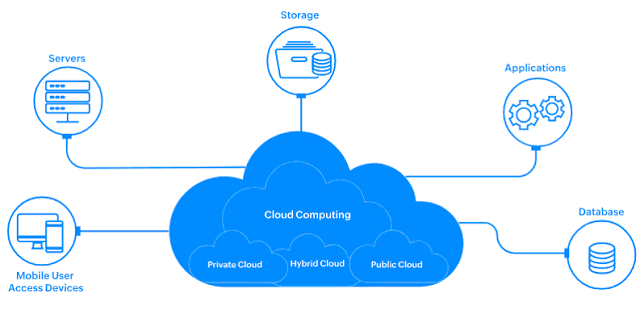
Cloud computing has changed the way modern applications are developed, deployed, and managed. Businesses can access computing resources over the internet without having to build and maintain all of their infrastructure themselves.
At the same time, software applications have become more complex. Developers need applications to work consistently across laptops, testing environments, data centers, and cloud platforms.
This is where containers in cloud computing have become increasingly important.
Containers provide a lightweight and consistent way to package an application together with the libraries, dependencies, and configuration it needs to run. This can make applications easier to develop, test, deploy, and move between environments.
Containers are now widely associated with cloud-native development, DevOps, microservices, and platforms such as Kubernetes.
But what exactly are containers, how do they work, and why are they so useful in cloud computing?
In this guide, we’ll explain what containers are in cloud computing, how containerization works, the benefits and challenges, common use cases, containers vs. virtual machines, container orchestration, security considerations, and best practices.
What Are Containers?
A container is a lightweight, isolated environment used to package and run an application along with the components it needs.
A container can include:
- Application code
- Libraries
- Dependencies
- Configuration
- Runtime components
The goal is to create a consistent application environment.
For example, a developer might build an application on a laptop using a specific version of a programming language and several libraries.
Without containerization, the application could behave differently when moved to another computer because of differences in software versions or configurations.
With a container, the application and its required dependencies can be packaged together.
This makes the application more portable and predictable.
What Is Containerization?
Containerization is the process of packaging software and its dependencies into containers.
Instead of installing an application directly onto an operating system, developers create a container image that contains everything required for the application to run.
That image can then be used to create containers in different environments.
A simplified workflow looks like this:
Developer creates application → Container image is built → Image is stored → Container is launched → Application runs
This process can make software delivery more consistent.
How Do Containers Work?
Containers use operating-system-level virtualization techniques to isolate application processes.
Unlike traditional virtual machines, containers typically share the host operating system kernel while maintaining separate user-space environments.
This makes containers generally lighter and faster to start than full virtual machines.
A container runtime is responsible for creating and running containers.
The exact technologies used depend on the platform and environment.
Containers vs. Virtual Machines
Containers and virtual machines both provide isolation, but they work differently.
Virtual Machines
A virtual machine typically includes:
- Application
- Libraries
- Guest operating system
- Virtual hardware
A hypervisor manages the virtual machines.
Containers
A container typically includes:
- Application
- Libraries
- Dependencies
- User-space components
Containers share the host operating system kernel.
Because containers don’t generally require a complete guest operating system for every application instance, they can be more lightweight.
Simple Comparison
Virtual Machine:
Hardware → Hypervisor → Guest OS → Application
Container:
Hardware → Host OS → Container Runtime → Container → Application
Neither technology is universally better.
The right choice depends on application requirements.
Why Are Containers Important in Cloud Computing?
Containers fit naturally into cloud computing because cloud environments require flexibility, scalability, and efficient resource utilization.
Organizations can package applications into containers and deploy them across cloud infrastructure.
This can simplify application deployment and help development teams maintain consistent environments.
Containers are especially useful for cloud-native applications and microservices.
1. Portability
One of the biggest advantages of containers is portability.
A container image can potentially run in different environments that support the required container runtime and dependencies.
For example, a developer can create a container locally and then deploy it to a cloud environment.
This reduces some of the differences between development and production environments.
2. Faster Application Deployment
Containers can start quickly compared with traditional virtual machines.
This can help organizations deploy applications more rapidly.
Developers can create standardized container images and use automated pipelines to deploy them.
3. Consistent Environments
A common development problem is:
“It works on my computer.”
An application may work on a developer’s machine but fail in production because of different dependencies or configurations.
Containers can package application dependencies into a consistent environment.
This doesn’t eliminate every compatibility problem, but it can significantly reduce environment-related differences.
4. Efficient Resource Usage
Containers are generally lightweight compared with full virtual machines.
A host can run many containers depending on available resources and workload requirements.
This can improve infrastructure utilization for suitable workloads.
5. Easy Scaling
Cloud applications often need to handle changing demand.
Containerized applications can be replicated to increase capacity.
For example, an application might normally run five container instances.
During a traffic increase, the platform could deploy additional instances.
Container orchestration platforms can automate this process.
6. Support for Microservices
Containers are commonly used to implement microservices architectures.
Instead of building one large application, developers can divide an application into smaller services.
Each service can run in its own container.
For example, an online store could have separate services for:
- User accounts
- Product catalog
- Payments
- Orders
- Inventory
Containers provide a convenient packaging and deployment model for these services.
7. Better DevOps Workflows
Containers work well with DevOps practices.
Development teams can build standardized images and integrate them into automated CI/CD pipelines.
A typical workflow might look like:
Code → Build → Test → Create container image → Scan → Deploy → Monitor
This allows organizations to automate large parts of the software delivery lifecycle.
What Is a Container Image?
A container image is a packaged template used to create containers.
It contains the application and the files required to run it.
Images are generally built from layers.
For example, an image might include:
- Base operating-system files
- Runtime environment
- Application dependencies
- Application code
- Configuration
When a container is launched, the runtime uses the image as its foundation.
What Is a Container Registry?
A container registry is a system used to store and distribute container images.
Development teams can push images to a registry and later pull them into testing or production environments.
Registries can also support:
- Image versioning
- Access control
- Vulnerability scanning
- Image management
Organizations should use trusted registries and protect them with appropriate security controls.
Containers and Kubernetes
When organizations run a small number of containers, manual management may be possible.
But managing hundreds or thousands of containers becomes complicated.
This is where Kubernetes and other container orchestration technologies become useful.
Kubernetes can automate tasks such as:
- Deploying containers
- Scaling applications
- Restarting failed workloads
- Distributing workloads
- Managing networking
- Performing rolling updates
This makes Kubernetes an important technology in many cloud-native environments.
However, Kubernetes adds operational complexity and isn’t required for every containerized application.
Containers in Public Cloud Computing
Public cloud providers offer infrastructure and managed services that can run containerized applications.
Businesses can use cloud computing to provide the servers, networking, storage, and other resources required for containers.
Managed container platforms can reduce the amount of infrastructure that organizations need to maintain themselves.
This can be particularly valuable for development teams that want to focus on applications rather than managing every aspect of the underlying infrastructure.
Containers in Hybrid Cloud
Organizations don’t always run all workloads in public cloud environments.
Some applications may remain on-premises because of regulatory, technical, latency, or business requirements.
Containers can provide a consistent packaging format across different environments.
For example, an application could use containers in an on-premises data center and also deploy containers in a public cloud.
This can support hybrid cloud strategies.
Containers and Multi-Cloud
Some organizations use multiple cloud providers.
Containers can help improve application portability across different environments.
However, containers don’t completely eliminate multi-cloud complexity.
Applications may still depend on provider-specific:
- Databases
- Storage
- Networking
- Authentication
- Monitoring
- APIs
Therefore, organizations should distinguish between container portability and complete application portability.
Common Use Cases for Containers
Containers are used across many industries and application types.
Web Applications
Web applications can be packaged and deployed as containers.
APIs
Containerized APIs can be scaled according to traffic.
Microservices
Each microservice can run in its own container.
Development and Testing
Teams can create consistent environments for developers and automated tests.
CI/CD
Containers can provide standardized build and deployment environments.
Data Processing
Containers can run specific data-processing workloads.
Machine Learning
Containerized environments can package machine-learning applications and their dependencies.
Batch Processing
Organizations can use containers for jobs that run periodically or in response to events.
Container Security
Containers provide isolation, but they aren’t automatically secure.
Organizations need to protect container images, runtimes, hosts, applications, and orchestration platforms.
Important practices include:
Use Trusted Images
Start with reputable base images and verify their source.
Scan Images
Check images for known vulnerabilities before deployment.
Keep Images Updated
Regularly update dependencies and base images.
Avoid Running as Root
Where practical, applications should run with the minimum privileges they require.
Use Least Privilege
Containers and services should receive only necessary permissions.
Protect Secrets
Passwords, API keys, and other sensitive values shouldn’t be hard-coded into container images.
Monitor Containers
Monitor container behavior, logs, resource usage, and security events.
Container Networking
Containers often need to communicate with other applications and services.
Container platforms provide networking mechanisms for connecting workloads.
In simple applications, networking may be straightforward.
In large microservices environments, however, service discovery, traffic management, security policies, and network visibility can become more complicated.
This is another reason orchestration and observability tools can become important as container environments grow.
Container Storage
Containers are often considered ephemeral, meaning a container can be created and removed without requiring its local filesystem contents to survive.
For applications that need persistent information, organizations typically use external storage services.
Examples include:
- Databases
- Cloud object storage
- Persistent volumes
- Network-attached storage
This separation between application containers and persistent data is common in cloud-native architectures.
Challenges of Using Containers
Containers provide many benefits, but they also introduce challenges.
Increased Complexity
Large container environments can become difficult to manage.
Security Risks
Poorly configured containers can expose vulnerabilities.
Networking Complexity
Microservices may require sophisticated networking.
Storage Management
Persistent data requires careful architecture.
Monitoring
Hundreds of containers can generate large amounts of logs and metrics.
Skills Requirements
Teams may need knowledge of containers, orchestration, networking, Linux, cloud platforms, and security.
Best Practices for Cloud Containers
Businesses can improve container deployments by following several best practices.
- Use small and efficient container images.
- Scan images for vulnerabilities.
- Keep dependencies updated.
- Use trusted image sources.
- Apply least-privilege permissions.
- Don’t store secrets directly in images.
- Define CPU and memory requirements.
- Monitor applications and containers.
- Use automated CI/CD pipelines.
- Maintain backup and recovery plans for persistent data.
- Regularly review container configurations.
When Should You Use Containers?
Containers can be a strong choice when:
- Applications need consistent environments.
- Teams use DevOps and CI/CD.
- Applications are built using microservices.
- Workloads need flexible scaling.
- Organizations want standardized deployment packages.
- Applications need to run across multiple environments.
Containers may not be necessary for every application.
A simple application could be easier to manage using a traditional virtual machine, managed application platform, or serverless service.
The architecture should match the workload.
Frequently Asked Questions
What are containers in cloud computing?
Containers are lightweight, isolated environments that package applications with the dependencies they need to run. They can be deployed on cloud infrastructure and help provide consistent application environments.
Why are containers used in cloud computing?
Containers provide portability, consistency, efficient resource usage, faster deployment, scalability, and support for modern cloud-native application architectures.
What is containerization?
Containerization is the process of packaging an application and its dependencies into a container image so it can run consistently across supported environments.
Are containers better than virtual machines?
Not necessarily. Containers are generally lighter and faster to start, while virtual machines provide stronger isolation boundaries and complete guest operating systems. The right choice depends on the workload.
What is Kubernetes used for?
Kubernetes is used to automate the deployment, scaling, and management of containerized applications.
Are containers secure?
Containers can be secure when properly configured, but they aren’t automatically secure. Organizations should protect images, hosts, permissions, secrets, networking, and orchestration platforms.
What is a container image?
A container image is a packaged template containing an application and the components required to run it. Containers are created from these images.
Final Thoughts
Containers in cloud computing have become an important technology for modern application development.
By packaging applications together with their dependencies, containers can help developers create consistent environments across development, testing, and production.
They can also support faster deployments, efficient resource utilization, application scaling, microservices, DevOps, and cloud-native development.
Technologies such as Kubernetes make it possible to manage large container environments automatically, while cloud platforms provide flexible infrastructure for running containerized applications.
However, containers aren’t a universal solution.
They introduce their own challenges around security, networking, storage, monitoring, and operational complexity.
Businesses should therefore evaluate their requirements before adopting container-based architectures.
When implemented properly, containers can provide a flexible and efficient way to build and operate modern cloud applications.
As cloud computing continues to evolve toward cloud-native architectures, automation, microservices, and distributed applications, understanding what containers are in cloud computing will remain an important skill for developers, DevOps engineers, cloud architects, and IT professionals.