
Modern businesses need to develop and deliver software faster than ever. Customers expect reliable websites, mobile applications, digital services, and frequent updates. At the same time, organizations need to maintain security, control costs, and keep their applications available.
Two technologies and approaches that play an important role in meeting these demands are cloud computing and DevOps.
Cloud computing provides flexible access to computing infrastructure and services, while DevOps is a set of practices that brings development and operations teams closer together and emphasizes automation, collaboration, continuous delivery, and reliable software operations.
Although cloud computing and DevOps are different concepts, they work extremely well together.
The cloud provides an environment where teams can quickly provision resources, while DevOps practices help teams develop, test, deploy, monitor, and improve applications efficiently.
In this guide, we’ll explain the relationship between cloud computing and DevOps, how they work together, their benefits, common tools and practices, challenges, real-world use cases, and best practices for organizations adopting both.
What Is Cloud Computing?
Cloud computing is the delivery of computing resources and technology services over the internet.
These resources can include:
- Servers
- Storage
- Databases
- Networking
- Software
- Analytics
- Artificial intelligence
- Security services
Instead of purchasing and maintaining all infrastructure themselves, organizations can access resources from cloud providers.
Cloud computing provides scalability and flexibility, allowing businesses to increase or decrease resources based on demand.
What Is DevOps?
DevOps is a combination of practices, processes, cultural principles, and technologies designed to improve collaboration between software development and IT operations.
Traditionally, developers and operations teams often worked separately.
Developers focused on writing code, while operations teams were responsible for deploying and maintaining applications.
This separation could create delays and communication problems.
DevOps aims to bring these teams together.
Common DevOps practices include:
- Continuous integration
- Continuous delivery
- Infrastructure as Code
- Automated testing
- Continuous monitoring
- Automated deployment
- Collaboration
- Feedback loops
The goal is to make software development and operations faster, more reliable, and more consistent.
How Are Cloud Computing and DevOps Related?
Cloud computing and DevOps are closely connected because cloud infrastructure makes many DevOps practices easier to implement.
For example, a development team can use cloud infrastructure to create a testing environment quickly.
Instead of waiting for physical servers to be purchased and configured, the team can provision resources through cloud services or automation.
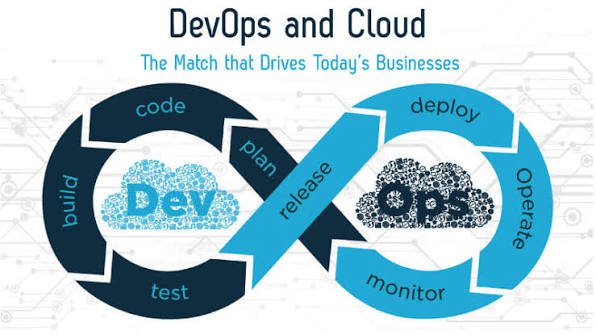
A typical workflow might look like this:
Developer writes code → Automated test → Build → Deployment → Cloud environment → Monitoring → Feedback
Cloud infrastructure provides the environment.
DevOps practices provide the processes and automation.
Cloud Computing Enables DevOps
One of the major reasons organizations combine cloud computing with DevOps is that cloud platforms provide programmable infrastructure.
Infrastructure can often be created, configured, modified, and destroyed through APIs and automation.
This supports DevOps principles.
For example, an organization can automatically create a test environment whenever a new application version is submitted.
After testing is complete, the environment can be removed.
This level of flexibility is difficult to achieve with purely manual infrastructure management.
1. Faster Infrastructure Provisioning
Traditional infrastructure can take significant time to provision.
Cloud platforms allow organizations to create many resources quickly.
DevOps teams can automate this process using Infrastructure as Code.
Instead of manually configuring servers, engineers can define the desired infrastructure in code.
This improves consistency and reduces manual work.
2. Continuous Integration
Continuous Integration, or CI, involves regularly integrating code changes into a shared codebase and automatically testing those changes.
Cloud environments can provide scalable infrastructure for CI systems.
Whenever developers submit code, automated systems can:
- Build the application.
- Run tests.
- Check code quality.
- Identify problems.
- Report results.
This helps teams discover issues earlier.
3. Continuous Delivery and Deployment
Continuous Delivery focuses on keeping software ready for release, while Continuous Deployment can automatically release changes when predefined conditions are met.
Cloud infrastructure can support automated application deployment across development, testing, staging, and production environments.
This allows organizations to release updates more frequently.
4. Infrastructure as Code
Infrastructure as Code, commonly called IaC, is one of the strongest connections between cloud computing and DevOps.
With IaC, infrastructure configurations are stored as code.
For example, a team can define:
- Servers
- Networks
- Databases
- Storage
- Access policies
The configuration can then be version-controlled and deployed repeatedly.
This reduces configuration differences between environments.
5. Automated Testing
DevOps emphasizes automation.
Cloud infrastructure can provide temporary environments for automated testing.
A software team can run:
- Unit tests
- Integration tests
- Security tests
- Performance tests
- End-to-end tests
Automating these tests helps identify problems before software reaches customers.
6. Continuous Monitoring
After an application is deployed, teams need to know whether it is working correctly.
Cloud platforms provide monitoring and logging capabilities that can help DevOps teams track:
- Application performance
- Infrastructure health
- Error rates
- Network activity
- Resource usage
- Availability
Monitoring creates feedback that developers and operations teams can use to improve applications.
Benefits of Combining Cloud Computing and DevOps
Organizations that effectively combine cloud computing with DevOps can gain several advantages.
1. Faster Software Delivery
Automation can reduce the time required to build, test, and deploy software.
Development teams can release improvements more frequently.
2. Greater Scalability
Cloud resources can scale according to workload requirements.
This allows DevOps teams to design applications that can respond to changes in demand.
3. Better Collaboration
DevOps encourages development, operations, security, and other teams to work together.
Cloud-based tools provide shared environments and systems that can support this collaboration.
4. Improved Reliability
Automated testing, deployment, monitoring, and infrastructure management can reduce certain types of human error.
Infrastructure can also be deployed consistently.
5. Faster Recovery
Automation can help teams restore environments quickly after failures.
Infrastructure can potentially be recreated using Infrastructure as Code rather than manually rebuilding systems.
6. More Efficient Resource Usage
Cloud infrastructure can be created and removed according to demand.
This can reduce the need to maintain large amounts of permanently running infrastructure.
7. Better Developer Productivity
Developers can spend more time building application features instead of waiting for infrastructure or performing repetitive deployment tasks.
Common DevOps Tools Used With Cloud Computing
A wide range of tools can support cloud-based DevOps workflows.
These may include tools for:
Source Code Management
Platforms that store and manage application source code.
CI/CD
Tools that automate building, testing, and deployment.
Infrastructure as Code
Technologies that define cloud infrastructure through configuration or code.
Containers
Container technologies package applications with their dependencies.
Container Orchestration
Platforms such as Kubernetes can automate the management of containerized applications.
Monitoring
Observability tools can collect metrics, logs, traces, and other operational information.
The exact tools should be selected according to organizational requirements rather than simply adopting every available technology.
Cloud DevOps and Containers
Containers have become an important part of modern cloud-native development.
A container packages an application and its dependencies into a consistent environment.
This can make applications easier to move between development, testing, and production environments.
DevOps teams can automate container builds, testing, scanning, and deployment.
Container orchestration can further automate application scaling and management.
Cloud DevOps and Kubernetes
Kubernetes is a popular platform for managing containerized applications.
DevOps teams can use Kubernetes to automate tasks such as:
- Application deployment
- Scaling
- Service discovery
- Load distribution
- Container management
Kubernetes can run in cloud environments and can also be deployed across multiple environments.
However, Kubernetes introduces its own operational complexity, so organizations should use it when its capabilities justify the additional management requirements.
DevSecOps: Adding Security to DevOps
Security shouldn’t be added only after software has been deployed.
DevSecOps integrates security practices into development and operations workflows.
Cloud-based DevOps environments can incorporate security into automated pipelines.
For example, a pipeline can automatically check:
- Dependencies
- Source code
- Container images
- Infrastructure configurations
- Access permissions
This can help organizations identify security problems earlier.
Challenges of Cloud DevOps
Although cloud computing and DevOps work well together, organizations may encounter challenges.
1. Increased Complexity
Cloud environments can contain large numbers of applications, services, networks, databases, and permissions.
Managing all of these systems requires expertise.
2. Security Risks
Automation can quickly deploy both secure and insecure configurations.
A mistake in an automated pipeline can potentially affect many resources.
Strong security controls and review processes are therefore important.
3. Cloud Costs
Automated deployments can create large numbers of resources.
If resources aren’t monitored, cloud costs can increase rapidly.
4. Skills Requirements
Teams need knowledge of:
- Cloud platforms
- Automation
- Networking
- Security
- Containers
- Infrastructure as Code
- Monitoring
Organizations may need to invest in training.
5. Cultural Resistance
DevOps isn’t only about tools.
It requires changes in communication, responsibilities, processes, and organizational culture.
Teams accustomed to working independently may need time to adapt.
Best Practices for Cloud DevOps
Organizations can improve their cloud DevOps strategy by following several best practices.
Automate Repetitive Tasks
Automate testing, deployment, infrastructure provisioning, and other repeatable processes.
Use Version Control
Store application and infrastructure configurations in version control systems.
Implement Strong Security
Use least privilege, multi-factor authentication, encryption, vulnerability scanning, and secure secrets management.
Monitor Continuously
Track application performance, infrastructure health, costs, and security events.
Build Small and Frequent Releases
Smaller changes are often easier to test, troubleshoot, and roll back.
Use Infrastructure as Code
Define infrastructure in a repeatable, version-controlled format.
Create Reliable Rollback Procedures
Teams should be able to reverse problematic releases quickly.
Monitor Cloud Costs
Use budgets, alerts, tagging, and resource-management processes.
How to Implement Cloud DevOps Step by Step
Organizations can begin with a gradual approach.
Step 1: Assess Current Development Processes
Identify manual tasks, bottlenecks, and recurring problems.
Step 2: Choose a Cloud Environment
Select a cloud platform based on workload and business requirements.
Step 3: Establish Version Control
Store source code and infrastructure configurations in a controlled repository.
Step 4: Automate Testing
Create automated tests that run whenever code changes.
Step 5: Build a CI/CD Pipeline
Automate application building, testing, and deployment.
Step 6: Introduce Infrastructure as Code
Define cloud infrastructure using reusable configurations.
Step 7: Add Monitoring
Monitor application health, performance, security, and infrastructure.
Step 8: Improve Continuously
Review the process and identify opportunities for greater automation, reliability, and security.
Real-World Example of Cloud Computing and DevOps
Consider a SaaS company that develops an online project-management application.
Developers submit code changes to a version-control system.
An automated pipeline then:
- Builds the application.
- Runs automated tests.
- Performs security checks.
- Creates a deployment package.
- Deploys the application to a testing environment.
- Runs additional tests.
- Deploys approved changes to production.
- Monitors application performance.
The cloud provides the infrastructure required for these environments.
DevOps practices automate the workflow.
This combination allows the company to release software quickly while maintaining greater consistency.
Frequently Asked Questions
What is the relationship between cloud computing and DevOps?
Cloud computing provides flexible infrastructure and services, while DevOps provides practices and automation for developing, deploying, and operating software efficiently. They complement each other closely.
Is DevOps required for cloud computing?
No. Organizations can use cloud computing without adopting DevOps. However, DevOps practices can make cloud environments easier to automate, manage, and scale.
Is cloud computing part of DevOps?
Cloud computing isn’t technically a part of DevOps, but cloud platforms are commonly used to implement DevOps practices.
How does cloud computing help DevOps?
Cloud computing provides programmable infrastructure, scalable resources, managed services, and environments that can be provisioned and changed quickly.
What is Infrastructure as Code?
Infrastructure as Code is a practice of defining and managing infrastructure through machine-readable configuration files or code.
What is DevSecOps?
DevSecOps integrates security into development and operations processes so that security checks and controls become part of the software delivery lifecycle.
What are the benefits of cloud DevOps?
Benefits can include faster software delivery, improved automation, greater scalability, more consistent deployments, better collaboration, and improved operational visibility.
Final Thoughts
Cloud computing and DevOps are different concepts, but they complement each other extremely well.
Cloud computing provides flexible infrastructure and technology services, while DevOps provides the culture, practices, automation, and processes needed to build and operate applications efficiently.
Together, they can help organizations deliver software faster, automate infrastructure, improve reliability, scale applications, and respond more quickly to changing business requirements.
The combination is particularly powerful when organizations use practices such as Infrastructure as Code, continuous integration, continuous delivery, automated testing, monitoring, and DevSecOps.
However, adopting cloud technology and DevOps tools alone isn’t enough.
Organizations need appropriate security controls, cost management, employee training, documentation, and a culture of collaboration.
The most successful cloud DevOps environments focus on continuous improvement.
As cloud platforms, automation, containers, artificial intelligence, and software development practices continue to evolve, the relationship between cloud computing and DevOps will become even more important.