
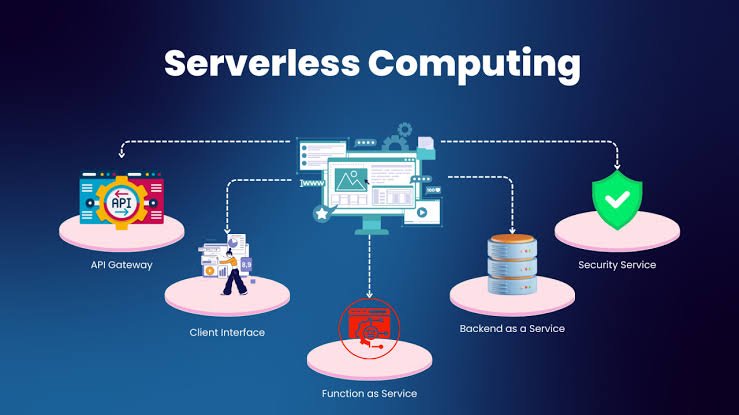
Cloud computing has changed the way businesses build and run applications. Instead of purchasing and maintaining physical servers, organizations can rent computing resources from cloud providers and scale those resources according to their needs.
But cloud technology continues to evolve.
One of the most interesting developments is serverless computing.
Despite its name, serverless computing doesn’t mean that applications run without servers. Servers are still involved. The difference is that developers don’t have to manage the underlying server infrastructure themselves.
Cloud providers handle much of the infrastructure management, allowing developers to focus more on application code and business functionality.
This approach can make application development faster and more flexible for certain types of workloads.
In this guide, we’ll explain what serverless computing is, how serverless architecture works, its benefits and challenges, common use cases, security considerations, and how it compares with traditional cloud computing.
What Is Serverless Computing?
Serverless computing is a cloud computing model in which the cloud provider manages the underlying infrastructure required to run application code.
Developers typically upload code or deploy applications without having to manually manage servers, operating systems, or much of the infrastructure beneath them.
The cloud provider is generally responsible for:
- Server provisioning
- Infrastructure maintenance
- Operating system management
- Capacity management
- Scaling
- Availability of the underlying platform
Developers primarily focus on application logic.
The term “serverless” therefore refers to server management being abstracted away from developers, not to the absence of physical servers.
How Does Serverless Computing Work?
Serverless applications commonly use an event-driven model.
A particular event triggers a piece of code.
For example:
User uploads a file → Event occurs → Serverless function runs → File is processed
Another example could be:
Customer places an order → Event occurs → Function validates order → Database is updated
The developer writes the function and defines when it should run.
The cloud platform handles the infrastructure required to execute it.
Depending on the service, the application may automatically scale up when many events occur and scale down when demand decreases.
What Is a Serverless Function?
A serverless function is a small piece of application code that runs in response to a specific event.
Functions are often designed to perform a focused task.
Examples include:
- Processing uploaded images
- Sending notifications
- Validating data
- Processing payments
- Transforming files
- Updating databases
- Running scheduled jobs
- Processing API requests
Functions generally execute only when triggered.
This is different from a traditional server application that may continuously run even when it isn’t receiving requests.
Serverless Computing vs. Traditional Servers
Traditional applications require organizations to manage infrastructure directly or indirectly.
Businesses may need to consider:
- Server capacity
- Operating systems
- Patching
- Scaling
- Availability
- Infrastructure monitoring
With serverless computing, the cloud provider handles much of this infrastructure management.
Traditional Model
Application → Operating System → Server → Data Center
Serverless Model
Application Code → Serverless Platform → Cloud Infrastructure
The serverless platform abstracts many infrastructure details from the developer.
Serverless Computing vs. Containers
Containers package applications and their dependencies into portable units.
Developers still need to manage container images, deployment environments, orchestration, networking, and other components, depending on the architecture.
Serverless functions generally provide a higher level of infrastructure abstraction.
Containers are often useful when applications require greater control over runtime environments.
Serverless is particularly attractive for event-driven and smaller pieces of application logic.
Key Characteristics of Serverless Computing
Serverless platforms typically have several important characteristics.
Automatic Scaling
Applications can automatically scale according to incoming workload.
Event-Driven Execution
Functions commonly run when triggered by events.
Managed Infrastructure
The cloud provider handles much of the underlying infrastructure.
Usage-Based Pricing
Many serverless services charge based on execution, resource consumption, requests, or related usage metrics.
Short-Lived Execution
Functions are commonly designed to perform a task and then stop.
Reduced Server Management
Developers spend less time maintaining servers.
Benefits of Serverless Computing
Serverless computing can provide several advantages for organizations.
1. Reduced Infrastructure Management
One of the biggest benefits is that developers don’t have to manage traditional servers for each serverless workload.
The cloud provider handles many infrastructure tasks.
This can reduce operational overhead.
Developers can focus more on writing application code rather than managing operating systems and server capacity.
2. Automatic Scaling
Serverless platforms can automatically increase or decrease execution capacity based on demand.
For example, an application may receive 100 requests in one minute and 100,000 requests during a marketing campaign.
A properly configured serverless platform can automatically respond to changing demand.
Scaling behavior and limits still need to be understood and tested.
3. Faster Development
Serverless architecture can allow developers to build specific application components quickly.
Instead of setting up a server for every small feature, developers can deploy focused functions.
This can shorten development cycles for suitable applications.
4. Potential Cost Savings
Serverless services often use consumption-based pricing.
With traditional infrastructure, a server may continue running even when it isn’t being heavily used.
With serverless functions, organizations may pay based on executions and resource usage.
This can be cost-effective for workloads with irregular or unpredictable traffic.
However, serverless isn’t always cheaper.
High-volume or continuously running workloads may sometimes be more economical on other architectures.
5. Easy Integration With Cloud Services
Serverless functions can integrate with databases, storage, queues, APIs, authentication services, and other cloud components.
This makes serverless useful for building cloud-native applications.
6. Improved Developer Productivity
By reducing infrastructure management responsibilities, serverless can allow development teams to concentrate on business logic.
This can be especially valuable for small development teams.
Challenges of Serverless Computing
Serverless architecture also has disadvantages.
1. Cold Starts
Some serverless platforms may experience startup latency when a function hasn’t been used recently.
This is often referred to as a cold start.
Cold-start behavior varies by platform, runtime, configuration, and workload.
Applications with strict latency requirements need to account for this.
2. Execution Limits
Serverless functions may have limits on:
- Execution duration
- Memory
- Temporary storage
- Request size
These limits vary by platform.
Long-running workloads may therefore be better suited to containers or traditional compute services.
3. Vendor Lock-In
Serverless applications may depend heavily on provider-specific services.
Moving such an application to another provider can require significant changes.
Developers should consider portability when it matters to the business.
4. Debugging Complexity
Distributed serverless applications can contain many functions and services.
Troubleshooting problems may therefore become more complicated.
Good logging, tracing, monitoring, and observability are important.
5. Cost Can Become Unpredictable
Consumption-based pricing can make costs difficult to estimate for highly variable workloads.
A sudden increase in traffic can cause a corresponding increase in function executions and related service usage.
Organizations should establish budgets and monitor usage.
6. Security Challenges
Serverless applications still require strong security controls.
Developers need to secure:
- Functions
- APIs
- Credentials
- Data
- Dependencies
- Permissions
Because serverless applications may contain many small functions, managing permissions carefully becomes particularly important.
Common Serverless Computing Use Cases
Serverless architecture is suitable for many types of applications.
1. Web APIs
Developers can create API endpoints using serverless functions.
For example:
Mobile App → API Gateway → Serverless Function → Database
This architecture can support applications without requiring developers to manage traditional application servers.
2. Image Processing
When users upload images, a serverless function can automatically resize, compress, or transform them.
3. File Processing
Businesses can use functions to process files uploaded to cloud storage.
For example, a company might automatically convert documents into different formats.
4. Notifications
Serverless functions can send emails, SMS messages, or push notifications when specific events occur.
5. Data Processing
Functions can process streams or batches of data and send the results to other services.
6. Scheduled Tasks
Serverless functions can execute on a schedule.
Examples include:
- Generating reports
- Cleaning temporary data
- Processing records
- Updating information
7. E-Commerce
An online store can use serverless functions for:
- Order processing
- Inventory updates
- Notifications
- Customer events
- Product image processing
8. IoT Applications
Internet of Things devices generate large numbers of events.
Serverless architecture can process these events without requiring developers to manage servers for every device.
Serverless Security Best Practices
Security remains essential in serverless environments.
Use Least Privilege
Each function should receive only the permissions it needs.
Protect Secrets
API keys and credentials should be stored securely.
Validate Input
Applications should validate and sanitize incoming data.
Secure APIs
Use authentication and authorization where required.
Monitor Activity
Track function executions, errors, unusual requests, and access patterns.
Keep Dependencies Updated
Third-party libraries can contain vulnerabilities.
Regularly review and update dependencies.
Serverless and Microservices
Serverless computing often works well with microservices architectures.
A large application can be divided into smaller components.
Each function or service can perform a specific responsibility.
For example:
- Authentication service
- Payment service
- Order service
- Notification service
- Reporting service
These components can communicate through APIs or event-driven systems.
However, serverless doesn’t require microservices, and microservices don’t necessarily require serverless computing.
Serverless and DevOps
Serverless architecture can work effectively with modern DevOps practices.
Development teams can automate:
- Testing
- Deployment
- Infrastructure configuration
- Monitoring
- Security checks
Continuous integration and continuous deployment can help teams release serverless functions efficiently.
Infrastructure as Code can also help create consistent environments.
How to Build a Serverless Application
Businesses and developers can approach serverless development step by step.
Step 1: Identify the Workload
Determine whether the application is event-driven or can be divided into independent tasks.
Step 2: Choose a Serverless Platform
Select a platform based on supported runtimes, integrations, pricing, security, and business requirements.
Step 3: Design the Architecture
Determine how functions, APIs, databases, storage, queues, and other services interact.
Step 4: Define Permissions
Give each function only the access it needs.
Step 5: Develop and Test
Create functions and test them under different conditions.
Step 6: Deploy Through Automation
Use repeatable deployment processes where practical.
Step 7: Monitor the Application
Track errors, latency, execution time, and resource usage.
Step 8: Optimize
Review performance, security, reliability, and cost regularly.
When Should You Use Serverless Computing?
Serverless is particularly useful when:
- Workloads are event-driven.
- Traffic varies significantly.
- Applications can be divided into small functions.
- Teams want to minimize server management.
- Rapid development is important.
- Usage-based pricing makes financial sense.
It may be less suitable for:
- Long-running workloads
- Applications requiring specialized operating systems
- Workloads requiring extensive infrastructure control
- Extremely latency-sensitive applications without appropriate optimization
- Systems that are difficult to divide into event-driven components
The right architecture depends on the workload.
Frequently Asked Questions
What is serverless computing?
Serverless computing is a cloud model in which the provider manages much of the infrastructure required to execute application code, allowing developers to focus primarily on application logic.
Does serverless mean there are no servers?
No. Servers are still used. “Serverless” means developers don’t have to manage the underlying servers directly.
How does serverless computing work?
Application code is typically executed in response to events. The cloud provider manages the infrastructure and can automatically scale execution based on workload.
What are the benefits of serverless computing?
Benefits can include reduced infrastructure management, automatic scaling, faster development, potential cost efficiency for suitable workloads, and easier integration with cloud services.
What are the disadvantages of serverless computing?
Common challenges include cold starts, execution limits, vendor lock-in, distributed-system complexity, cost unpredictability, and security management.
Is serverless computing cheaper?
It can be cheaper for intermittent or variable workloads because organizations often pay based on actual usage. However, pricing depends on workload characteristics and architecture.
Is serverless computing secure?
Serverless applications can be secure when properly designed and managed. Developers still need to protect identities, permissions, APIs, dependencies, data, and application code.
Final Thoughts
Serverless computing represents a major shift in how applications can be built and operated in the cloud.
Rather than managing traditional servers, developers can deploy application code and allow the cloud provider to handle much of the underlying infrastructure.
This can make serverless particularly useful for event-driven applications, APIs, file processing, automation, data processing, IoT systems, and other workloads that can be divided into focused tasks.
The biggest advantages include reduced infrastructure management, automatic scaling, faster development, and potentially efficient costs for workloads with variable demand.
However, serverless isn’t the perfect solution for every application.
Execution limits, cold starts, vendor lock-in, debugging complexity, security requirements, and unpredictable costs can create challenges.
The best approach is to evaluate serverless based on the application’s actual requirements.
For businesses and developers building modern cloud applications, understanding how serverless computing works is increasingly important. As cloud platforms continue to evolve, serverless architecture will likely remain an important part of cloud-native application development.